Building Qt v6.10.1 Libraries & Docker Images
Context
In my endeavor to implement a text-to-speech function into to my C++ application,
I need additional Qt libraries to be included in my custom build Qt version.
The current latest tagged version is v6.10.1. The distribution used is Ubuntu 24.04 LTS
for x86_64 and aarch64 platforms where the aarch64 is a RaspberryPi 5 system.
The Docker image to be used in CI/CD pipelines is the amd64/gnu-cpp:24.04-6.10.1 since it
builds all platform targets using cross-compilers.
Instead of a RaspberryPi the same Docker container can be built from an x86_64 system using QEMU but is a lot slower.
Process
1) Build the Docker Container
First, a container with a C++-capable compiler is required.
My GitLab project "Docker Gitlab Runner"
provides cpp-builder.sh
a script to build a fresh updated one tagged gnu-cpp:24.04.
Pull the Ubuntu base image and also push it to our own Nexus Docker registry to build consistently over time.
Build the actual image needed for the Qt build and also push it.
List the images on our own Nexus Docker registry using the Nexus API.
The output shows updated images having the date 2025-12-02.
Image/Name               Tag/Version  Id                            Size      Modified At
amd64/gnu-cpp            24.04        ZG9ja2VyLWltYWdlOjRmMWJiY2Rk  6.159 GB  2025-12-02 16:05:34
amd64/gnu-cpp            24.04-6.8.1  ZG9ja2VyLWltYWdlOmVkNTMzNjk3  6.171 GB  2025-03-18 17:29:10
amd64/gnu-cpp            24.04-6.9.1  ZG9ja2VyLWltYWdlOjQ2ODk3Mzk   6.171 GB  2025-08-26 09:25:21
amd64/ubuntu             24.04        ZG9ja2VyLWltYWdlOjhiOGFiMDUx  0.529 GB  2025-12-02 16:01:20
arm64/gnu-cpp            24.04        ZG9ja2VyLWltYWdlOjc4ZGRlNmU4  6.132 GB  2025-12-02 16:04:12
arm64/gnu-cpp            24.04-6.8.1  ZG9ja2VyLWltYWdlOjI5YzIyYTBi  6.138 GB  2025-03-18 16:48:15
arm64/gnu-cpp            24.04-6.9.1  ZG9ja2VyLWltYWdlOjUzODQ1NDE2  6.138 GB  2025-08-26 09:23:41
arm64v8/ubuntu           24.04        ZG9ja2VyLWltYWdlOmRhYTY2ZDJl  0.529 GB  2025-12-02 15:55:46
2) Start the Docker Container
This command starts the Docker container gnu-cpp depending on the platform (amd64/arm64) in the background.
3) Attach to the Docker Container
To allow running remotely in the background, use the screen command.
This next command attaches to the container.
Change the current directory to /mnt/project/build-src in the container where the build.sh shell script (symlink)
resides.
4) Linux: Build for Linux and Windows
Both Linux and Windows are built from a Linux Docker container using the cross-compile option for the Qt build system.
4.1) Install required packages
Install the packages required for building the Qt libs.
4.2) Make cloning sources local
The qt-lnx symlink is pointing to /tmp/qt-lnx in the container for faster access.
4.3) Clone the sources
Clone the source for a specified Qt version.
Initialize the source tree by calling the init-repository shell script from the cloned repository.
This will take a long time since a huge amount of data is being additionally cloned.
4.4) Configure the Linux build environment
For some reason a fix is needed in the form of setting a flag in the CMakeCache.txt build file.
4.5) Build the Linux libraries
4.6) Install the Linux libraries
This creates a versioned Qt directory in the project subdirectory '
4.7) Configure the Windows build environment
Using the same source tree as for Linux, the Windows build environment is configured.
4.8) Build the Windows libraries
4.9) Install the Windows libraries
This creates a versioned Qt directory in the project subdirectory '
5) Windows: Build for Windows
Build for Windows only using Cygwin to run the same bash script as for Linux.
The script depends on two files:
.tools-dir<hostname>: Directory where the gnu compiler is located (e.g./cygdrive/p/Tools/mingw1320_64-posix/bin)..install-dir<hostname>: Install directory for the 'install' command (e.g./cygdrive/s/applications/library/qt/w64-x86_64).
5.1) Install dependencies
5.2) Clone the repository
5.3) Initialize the repository
5.4) Build the libraries
5.4) Install the Libraries
Installs the libraries in the designated library location.
6) Docker Images
Since the Qt Libraries are stored onto
the Nexus server.
The docker images can be created with a Qt library attached to it.
The previous mentioned script,
cpp-builder.sh
is used with option --qt-ver '6.10.1' to the Nexus server
available Qt libraries
version 6.10.1.
6.1) Image for x86_64 (amd64)
Build the image for the designated Qt version and push it to the Nexus server.
To push the image also to Docker Hub
./cpp-builder.sh --qt-ver '6.10.1' docker-login
./cpp-builder.sh --qt-ver '6.10.1' docker-push
# Optional command to make the image the latest.
./cpp-builder.sh --qt-ver '6.10.1' docker-latest
6.2) Image for aarch64 (arm64)
Executed from the RaspberryPi.
To push the image also to Docker Hub
./cpp-builder.sh --qt-ver '6.10.1' docker-login
./cpp-builder.sh --qt-ver '6.10.1' docker-push
# Optional command to make the image the latest.
./cpp-builder.sh --qt-ver '6.10.1' docker-latest
Results
Qt Libraries
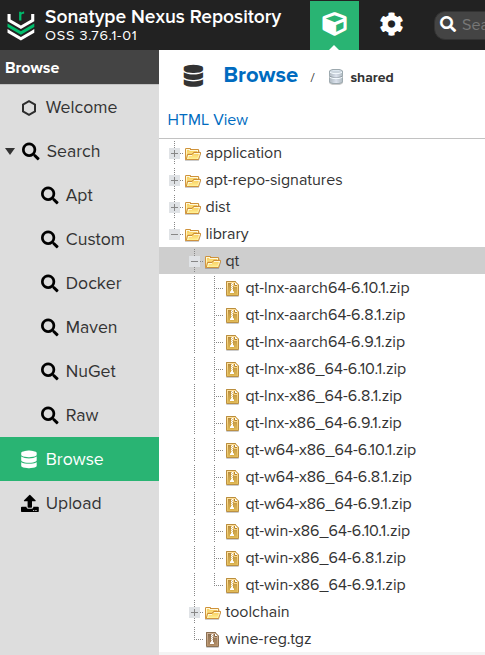
The created library tree is available from the Nexus server:
library/qt
        ├── lnx-aarch64
        │   ├── 6.10.1
        │   ├── 6.8.1
        │   └── 6.9.1
        ├── lnx-x86_64
        │   ├── 6.10.1
        │   ├── 6.7.2
        │   ├── 6.8.1
        │   └── 6.9.1
        ├── w64-x86_64
        │   ├── 6.10.1
        │   ├── 6.8.1
        │   └── 6.9.1
        └── win-x86_64
            ├── 6.10.1
            └── 6.9.1
The files shared from Nexus are used in the QT versioned builds of the Docker images.
Docker Images
Overview of the Docker and Qt libraries images built:
| Platform | Architecture | Toolchain | Qt Ver | Docker Image |
|---|---|---|---|---|
| Linux | x86_64 | MinGW 13.3.0 | amd64/gnu-cpp:24.04 | |
| Linux | aarch64 | MinGW 13.3.0 | arm64/gnu-cpp:24.04 | |
| Linux | x86_64 | MinGW 13.3.0 | 6.10.1 | amd64/gnu-cpp:24.04-6.10.1 |
| Linux | aarch64 | MinGW 13.3.0 | 6.10.1 | arm64/gnu-cpp:24.04-6.10.1 |
| Windows | x86_64 | MinGW 13.2.0 | 6.10.1 |
Listing of Nexus Docker images on the Nexus server.
Image/Name               Tag/Version   Id                            Size      Modified At
amd64/gnu-cpp            24.04         ZG9ja2VyLWltYWdlOjRmMWJiY2Rk  6.159 GB  2025-12-02 16:05:34
amd64/gnu-cpp            24.04-6.8.1   ZG9ja2VyLWltYWdlOmVkNTMzNjk3  6.171 GB  2025-03-18 17:29:10
amd64/ubuntu             24.04         ZG9ja2VyLWltYWdlOjhiOGFiMDUx  0.529 GB  2025-12-02 16:01:20
arm64v8/ubuntu           24.04         ZG9ja2VyLWltYWdlOmRhYTY2ZDJl  0.529 GB  2025-12-02 15:55:46
arm64/gnu-cpp            24.04-6.8.1   ZG9ja2VyLWltYWdlOjI5YzIyYTBi  6.138 GB  2025-03-18 16:48:15
arm64/gnu-cpp            24.04         ZG9ja2VyLWltYWdlOjc4ZGRlNmU4  6.132 GB  2025-12-02 16:04:12
amd64/gnu-cpp            24.04-6.9.1   ZG9ja2VyLWltYWdlOjQ2ODk3Mzk   6.171 GB  2025-08-26 09:25:21
arm64/gnu-cpp            24.04-6.9.1   ZG9ja2VyLWltYWdlOjUzODQ1NDE2  6.138 GB  2025-08-26 09:23:41
arm64/gnu-cpp            24.04-6.10.1  ZG9ja2VyLWltYWdlOmEyYTAxMGYz  6.138 GB  2025-12-02 23:37:34
amd64/gnu-cpp            24.04-6.10.1  ZG9ja2VyLWltYWdlOmYxYmJjZGQw  6.172 GB  2025-12-08 05:35:50
#!/bin/bash
USER="avolphen"

# Get list of repositories
REPOS=$(curl -s "https://hub.docker.com/v2/repositories/${USER}/?page_size=100" | jq -r '.results[].name')

# Loop through each repository and get tags
for repo in $REPOS; do
    echo "Repository: ${USER}/${repo}"
    curl -s "https://hub.docker.com/v2/repositories/${USER}/${repo}/tags?page_size=100" | jq -r '.results[].name'
    echo ""
done