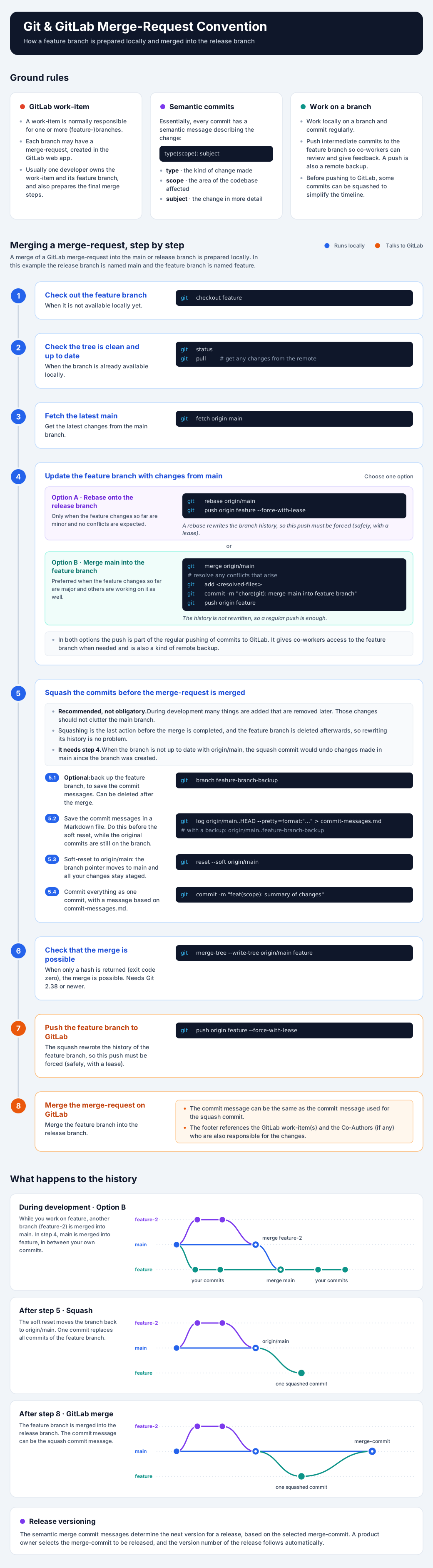
Convention on Git and GitLab Merge-Requests
GitLab Work-Item
For GitLab a work-item is normally responsible for one or more (feature-)branches. Each branch can have a merge-request or not created using the GitLab GUI/Webapp.
Usually one developer is responsible for a work-item and its feature branch, and this developer also prepares the final merge steps described below.
Semantic Conventional Commits
Essentially, all commits have semantic conventional commit messages.
Semantic conventional commits are used to describe the changes made in a commit. They consist of a type, a scope, and a subject. The type describes the type of change made, the scope describes the area of the codebase affected, and the subject describes the change in more detail.
Work on a Branch
A developer works locally on a branch and makes regular commits. Intermediate pushes of commits to a feature branch are recommended to enable co-workers to review and provide feedback. Such a push also serves as a remote backup. Before a push to GitLab, some commits can be combined (squashed) to simplify the timeline.
Merge of a Merge Requests
Note: the branch used for releases is here named
mainand the feature branch is namedfeaturefor the purpose of this example.
A merge of a GitLab merge-request into the main or release branch is prepared locally and needs the following steps:
- When not available yet, 'checkout' the feature branch.
git checkout feature- When available, check if the tree is clean and up to date
git statusgit pull(get any changes from the remote)- Get the latest changes from the main branch.
git fetch origin main- Update the feature branch with changes made in the main branch.
- Option A: with a rebase onto the release branch.
Only when feature changes so far are minor and no conflicts are expected.git rebase origin/maingit push origin feature --force-with-lease
A rebase rewrites the branch history, so this push must be forced (safely, with a lease).
- Option B: with a merge of main into the feature branch.
Preferred when feature changes so far are major and others are working on it as well.git merge origin/main- Resolve any conflicts that may arise during the merge.
git add <resolved-files>git commit -m "chore(git): merge main into feature branch"git push origin feature
The history is not rewritten, so a regular push is enough.
Note: In both options the push is part of the regular pushing of commits to GitLab. It gives co-workers access to the feature branch when needed and is also a kind of remote backup.
- Squash the commits before a merge of a merge-request on GitLab.
Squashing everything into one commit is recommended, but not obligatory. During development many things are added that are removed later, and those changes should not clutter the main branch.
Squashing is the last action before the merge is completed and the feature branch is deleted afterwards,
so rewriting its history is no problem. It does require that step 4 was done:
when the feature branch is not up to date with origin/main, the squash commit would undo
changes that were made in main since the branch was created.
- Optional: back up the feature branch to save commit messages.
The backup is not really needed and can be deleted after the merge-request is merged.git branch feature-branch-backup
- Create a Markdown file to save the commit messages for the commit later.
Do this before the soft-reset in the next step: afterwards the original commits are no longer part of the feature branch.git log origin/main..HEAD --pretty=format:"## Commit: %h%n### From%n- Author: %an <%ae>%n- Date: %ai%n### Message%n%n%B%n---" > commit-messages.md- When a backup branch was made, its commits can be used as well:
git log origin/main..feature-branch-backup --pretty=format:"## Commit: %h%n### From%n- Author: %an <%ae>%n- Date: %ai%n### Message%n%n%B%n---" > commit-messages.md
- Soft-reset the feature branch to 'origin/main'.
This aligns your branch pointer with the 'main' branch while keeping all your uncommitted code modifications staged.git reset --soft origin/main
- Commit all changes made in the feature branch using a commit message based on the
commit-messages.mdfile.git commit -m "feat(scope): summary of changes"
- Check if the feature merge with the 'main' branch is possible.
When only a hash is returned - exit-code is zero - the merge is possible.
This needs Git 2.38 or newer. git merge-tree --write-tree origin/main feature- Push the feature branch to the remote repository on GitLab.
The squash rewrote the history of the feature branch, so this push must be forced (safely, with a lease). git push origin feature --force-with-lease- Merge the feature branch into the release branch on GitLab.
- The commit message for the merge-request can be the same as the commit message used for the squash commit.
- The commit message footer references the GitLab work-item(s) and the Co-Authors (if any) who are also responsible for the changes.
Note: The semantic merge commit messages determine the next version for a release based on the selected merge-commit.
A product owner selects the merge-commit to be released and automatically determines the version number of the release. Add thecommit-messages.mdfile to the.gitignorefile. Just in case.
The Merge Workflow