Linux Citrix Client Install
Client Installation
Download the Linux Workspace App from Citrix and install it
using the Apt GUI or command line dpkg -i <deb-package-name>.
Hiding Citrix User
When the installation is done a regular user citrixlog is created which also appears on the login screen.
There are 2 ways to hide this user from the login screen.
1) Using sddm config
For the sddm display manager a file /etc/sddm.conf.d/citrixlog_hide.conf can be
created to hide this user using the next content.
2) Changing the user ID
Where 900 is the new group and user id and 1002 the old one.
By default the sddm service does not show user in the login screen with an ID lower than 1000.
Option -xdev prevents descending into other filesystems.
# Stop the service using the effected user.
service ctxlogd stop

# Change group and user ID.
usermod -u 900 citrixlog
groupmod -g 900 citrixlog

# Replace old group and user ID's
find / -xdev -group 1002 -exec chgrp -h citrixlog {} \;
find / -xdev -user 1002 -exec chown -h citrixlog {} \;

# Start the service using the effected user again.
service ctxlogd start
Install Missing Certificate
The standard Citrix Client install is missing a sectigo certificate AAACertificateServices used by RAM-IT which seems to be already available in Windows.
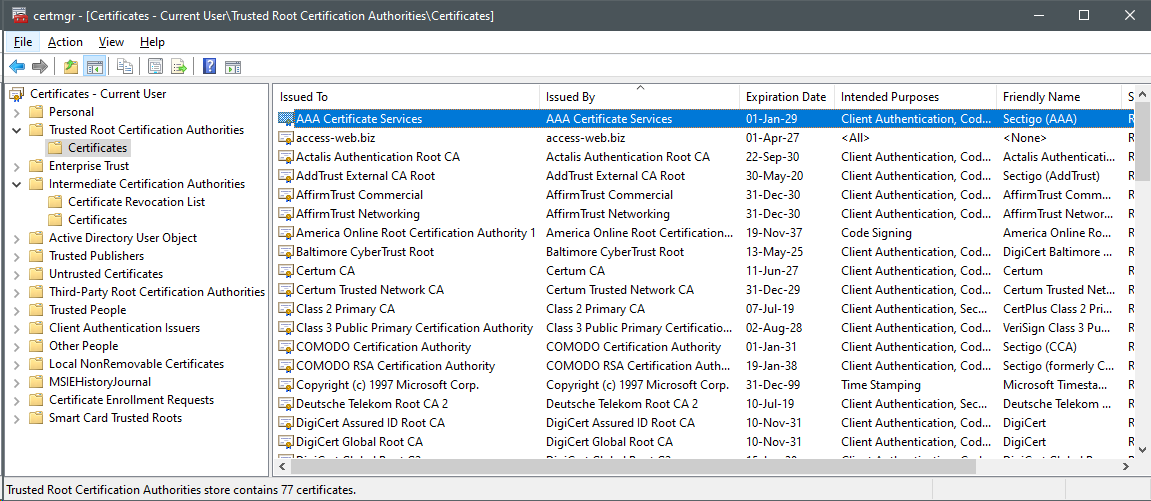
Since RAM-IT does not support other OS'es then Windows the missing certificate needs to be installed manually.
Certificate Download and Conversion
Download from Comodo here in the temporary directory.
Since the file is in DER-format it needs to be converted to the PEM-format.
With this single command the certificate is downloaded and converted in the right location.
sudo wget -O - http://crt.comodoca.com/AAACertificateServices.crt | sudo openssl x509 -inform DER -out /opt/Citrix/ICAClient/keystore/cacerts/AAACertificateServices.pem
Alternative for Download
As an alternative for downloading the certificate the PEM-file can be exported from the Windows Certificate Manager.
Run the application certmgr go to the \\Trusted RootCertification Authorities\Certificates path and export AAA Certificate Services as a file.
Register / Rehash Certificates
Next command needs to be called when a certificate has been added.
It creates symlink in the same location as the PEM-file having a hashed name.
Fixing remote Keyboard-Type
To fix the keyboard layout when it defaults to NL for some unexplainable reason. On the Windows side the keyboard can not be changed any longer because it is disabled. To intercept the ICA-file (ini-file) the command handling the is replaced by a shell script which changes the ICA-file setting the correct 'us' KeyboardLayout key.
The following shell script citrix-ica-keyboard-fix.sh replaces the handler with a shell script.
#!/usr/bin/env bash

# Bailout on first error.
set -e

# Check if the needed commands are installed.
COMMANDS=("crudini")
for COMMAND in "${COMMANDS[@]}"; do
    if ! command -v "${COMMAND}" >/dev/null; then
        echo "Missing command '${COMMAND}' for this script!"
        exit 1
    fi
done

# Location of the application 'wfica'.
ica_client_dir="/opt/Citrix/ICAClient"
# Command to intercept.
cmd_file="${ica_client_dir}/wfica"

# Sanity check if Citrix client is installed.
if [[ ! -d "${ica_client_dir}" ]]; then
    echo "Directory '${ica_client_dir}' does not exist, is Citrix client installed?"
    exit 1
else
    echo "Citrix client is installed."
fi
# Sanity check on renamed command file existence.
if [[ -f "${cmd_file}.bin" ]]; then
    echo "Fix is installed already."
    exit 1
else
    echo "Fix is NOT installed yet."
fi
# Sanity check on current command file.
if [[ "$(file "${cmd_file}" --mime-type --brief)" == "text/x-shellscript" ]]; then
    echo "Fix is installed already."
    exit 0
fi

read -rp "Install fix [y/N]?" && if [[ $REPLY = [yY] ]]; then
    # Check if root is executing.
    if [[ $(id -u) -ne 0 ]]; then
        echo "Need to be root to execute this command!"
        exit 1
    fi
    # Rename executable to 'wfica.bin'.
    mv --interactive "${cmd_file}" "${cmd_file}.bin"
    # Create replacement 'wfica' with a shell script.
    cat <<'EOF' >"${cmd_file}"
#!/bin/bash

# Get the script directory.
script_dir="$(cd "$(dirname "${0}")" && pwd)"

# When the first argument is a file.
if [[ -f "${1}" ]]; then
    crudini --set "${1}" 'WFClient' 'KeyboardLayout' 'us'
fi

# Now open the modified file.
"${script_dir}/wfica.bin" "${@}"
EOF
    # Make the file executable.
    chmod +x "${cmd_file}"
fi