MKLINK for All Users
For allowing mklink to be used by regular users there are 2 options.
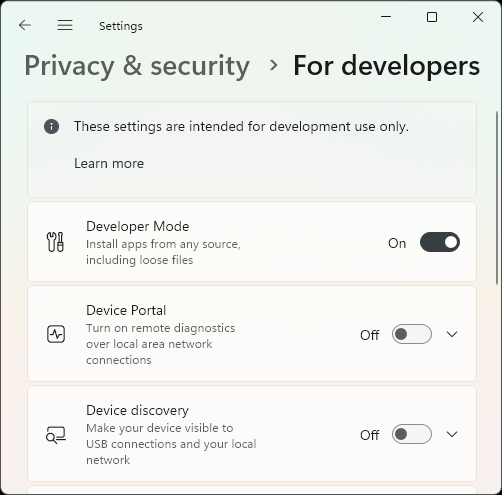
- Switching to 'Developer mode'
- Edit 'Local Group Policy'
Switching to 'Developer Mode'
On the command line execute start ms-settings:developers and in the settings appearing set the switch accordingly.
Edit 'Local Group Policy'
Graphical Solution
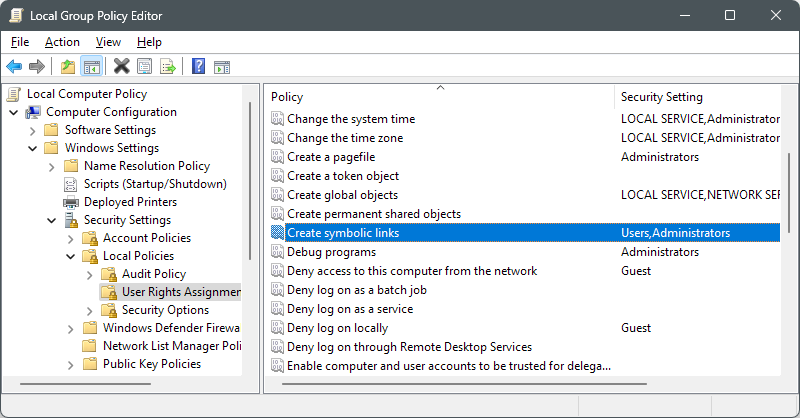
On the command line execute gpedit and add the Users group to the policy Creating symbolic links.
- Computer Configuration
- Windows Settings
- Security Settings
- Local Policy
- User Rights Assignment
- Creating symbolic links
Command-Line Solution
Download the command-line tool lgpo.exe from Microsoft here (it's in a zip-file) or download it directly if the this link is valid.
This command allows modifying 'Local Group Policies'.
Seems curl.exe command is part of Windows 11 so
curl https://download.microsoft.com/download/8/5/C/85C25433-A1B0-4FFA-9429-7E023E7DA8D8/LGPO.zip --output %HOMEDRIVE%%HOMEPATH%\Downloads\LGPO.zip
Needs some further investigation...
Note
Deleting a symlink in Windows is done using
rmdirand notdelwhich is confusing because in Linux a >symbolic link is considered a file and not a directory.